
AI Image Prompt Examples for Personalized Products
Browse ready-to-use AI image prompt examples for trending custom products. Copy any prompt, paste it into Teeinblue, and turn a customer’s photo into a ready-to-sell design in minutes. Every prompt works with the latest AI models: GPT Image, Nano Banana, Seedream, and more.
Favorite AI Image Prompt Examples
Browse all promptsAI Image Prompt Examples for People Photos
Browse all People promptsCustom portraits are among the best-selling personalized products, and the style you pick is what drives sales. These AI image prompt examples turn a customer’s photo into portrait art in multiple styles, ready to print on mugs, canvases, t-shirts, and more.
 Watercolor
Please sign in to view this prompt. Once signed in, you can copy the full prompt.
 Cartoon
Transform the uploaded photo into a flat cartoon illustration in a cute retro storybook style. Strongly stylize - clearly a flat cartoon, NOT realistic, NOT semi-realistic, NOT 3D: simplified rounded faces, big round cartoon eyes, small simple features, smooth flat coloring with minimal shading, clean simple outlines. For a person keep them recognizable (hair, coloring). For a pet keep breed and markings. Sweet, charming storybook look. Dress the subject in cozy Christmas clothing - knitted Christmas sweaters, Santa hats or scarves. COMPOSITION: Pose: show the subject in a simple seated pose. Thin refined linework, airy and elegant. Overall: minimal, delicate, and the subject is a simple flat cute cartoon in vintage storybook style. No text anywhere in the image.
 Toybox Figure
Transform the uploaded photo into a premium personalized collectible action figure package. Preserve the exact facial likeness, hairstyle, beard, smile, age, skin tone, facial structure, and identity of the person from the uploaded photo. The character must remain instantly recognizable. Create a high-end 3D stylized vinyl figure with: - Pixar-inspired character design - Slightly oversized head (approximately 1.8x normal proportions) - Smaller stylized body - Warm friendly smile - Soft expressive eyes - Approachable dad personality - Premium collectible toy sculpting - Crossed-arms pose - Realistic hair and beard details - Family-friendly appearance - High-quality vinyl toy finish PACKAGING DESIGN Create a luxury Father's Day collectible package with: - Clear transparent molded blister cover - Rounded-corner backing card - Soft pastel blue and warm cream color palette - Modern premium gift packaging design - Elegant minimalist layout - Clean typography - Personalized gift aesthetic - Bright cheerful presentation IMPORTANT: - The backing card must have a completely solid top edge. - NO retail hanger hole. - NO peg-hook cutout. - NO die-cut opening. - NO retail display slot. - NO packaging cutouts of any kind. - The top edge must be smooth, uninterrupted, and premium. PACKAGE TEXT Main title: BEST DAD EVER Subtitle: LIMITED EDITION Optional small badge: #1 DAD ACCESSORIES Place accessories neatly in individual molded compartments: - TV remote - Power drill - BBQ grill - Pint of beer All accessories should be highly detailed miniature collectibles. LAYOUT - Figure centered in package - Accessories arranged symmetrically around figure - Balanced composition - Generous spacing - Premium retail-quality presentation - Clean organized design BACKGROUND INSIDE PACKAGE Create a bright cozy family living room scene: - Large sunlit windows - Warm natural daylight - Soft neutral furniture - Comfortable family-home atmosphere - Bright airy interior - Tasteful modern decor PHOTOGRAPHY STYLE - Etsy bestseller product mockup style - High-key lighting - Bright commercial photography - Soft shadows - Warm daylight tones - Clean white balance - Premium gift-shop presentation - Luxury product advertising photography - Photorealistic blister packaging materials - Realistic reflections on clear plastic - Extremely detailed - Sharp focus - Ultra realistic - 8K quality MOOD - Warm - Cheerful - Family-oriented - Heartwarming Father's Day gift - Premium personalized keepsake - Friendly and inviting AVOID - Dark packaging - Black packaging - Toy-store shelf environment - Comic-book collectible style - Dramatic shadows - Cinematic lighting - Horror atmosphere - Aggressive styling - Military toy aesthetics - Action-hero appearance - Retail hanger hole - Peg hook opening - Age labels - Excessive badges - Cluttered design - Empty plastic space - Text distortions - Blurry accessories
 Faceless
Using the people in the UPLOADED REFERENCE PHOTO as the subjects, create a FLAT FACELESS PORTRAIT ILLUSTRATION — a clean, simple modern illustration where the faces are intentionally BLANK. MATCH THE UPLOADED PHOTO: - Draw EVERY person in the photo — the EXACT number and the same people. Do NOT add, remove or invent anyone. - Keep each person clearly recognizable from EVERYTHING EXCEPT the face: hairstyle & hair color, facial hair (mustache / beard), glasses, skin tone, body shape, clothing (style & color), and pose / positioning exactly as in the photo. FACELESS FACES (key rule): - Each face is COMPLETELY BLANK — NO eyes, NO eyebrows, NO nose, NO mouth. Just smooth, even skin tone with soft light shading. - DO keep facial hair (mustache / beard) and glasses if present, since they frame the face — but never add eyes, nose or mouth. STYLE: - Flat, clean, semi-realistic digital illustration with soft simple shading and smooth color fills. Natural, true-to-photo colors (hair, skin, clothing). - Tidy clean linework, modern and minimal. Waist-up, framed as in the photo. BACKGROUND: - Plain solid WHITE (or transparent) background — clean, no scenery — so it can be printed on mugs and other products. Mood: warm, funny, heartfelt personalized gift illustration. Clean print-ready design, white background. AVOID: adding ANY facial features (no eyes, eyebrows, nose or mouth), changing hair / clothing / pose / skin tone, wrong number of people, busy or detailed backgrounds, heavy outlines, photorealism, 3D rendering.
 Caricature
Transform the uploaded photo into a professional custom caricature portrait. Preserve the exact identity, facial structure, hairstyle, age, gender, clothing, pose, and relationship of all subjects. Keep every person instantly recognizable. Create a commercial gift-style caricature with: - Head enlarged to approximately 180–220% of normal size - Face slightly wider than realistic proportions - Smile enlarged significantly wider than reality - Teeth larger and more prominent - Cheeks fuller and more expressive - Ears slightly oversized - Eyebrows enhanced for expression - Eyes only slightly enlarged (not anime or Disney eyes) - Friendly humorous exaggeration - Happy, joyful facial expressions Style: - Professional caricature artist style - Custom canvas gift portrait - Etsy bestseller caricature aesthetic - Hand-painted digital illustration - Smooth realistic rendering - Detailed skin texture - Bright commercial artwork - Polished airbrush finish - High-end caricature commission Important: - Prioritize exaggerated smile and facial proportions over enlarged eyes - Avoid Disney, anime, Pixar, cartoon princess, CGI movie character appearance - Faces should look like caricatures drawn by a professional artist, not animated film characters Background: - Simple warm yellow gradient - Clean studio backdrop Ultra detailed, professional caricature artwork, print-ready quality.
 Line Art
IMPORTANT: pure black outline only, no color anywhere, keep it clean and minimal, all faces blank. Using the people in the UPLOADED REFERENCE PHOTO as the subjects, create a SINGLE-LINE OUTLINE PORTRAIT — a delicate, thin black continuous-line contour drawing, with NO color and NO shading. MATCH THE UPLOADED PHOTO: - Draw EVERY person — the EXACT number, same people, same grouping and pose. Do NOT add, remove or invent anyone. - Capture each person's recognizable OUTLINE: hair shape, glasses, hat, clothing silhouette, hands, baby carrier, and pose exactly as in the photo. FACELESS RULE — APPLIES TO EVERYONE: - EVERY face is COMPLETELY BLANK — no eyes, eyebrows, nose, mouth, or expression lines. Only the head/face outline. - Applies equally to adults, children AND babies. Do NOT draw any face on the baby. - Inside the face keep ONLY hair outline, glasses, and hat. LINE STYLE — PURE BLACK, NO COLOR: - 100% PURE BLACK lines on a plain WHITE background. ZERO color anywhere — no colored fills, no yellow/orange/blue tints, no grey, no shading, no solid black fills. Ignore the photo's colors; everything becomes plain black outline only. - Thin, clean, even-weight contour lines. All shapes open and white inside. KEEP IT SIMPLE & CLEAN (important): - Draw only the MAIN outlines and essential shapes. Minimal, elegant, uncluttered. - Do NOT add busy/unnecessary detail: no fabric fold clutter, no fingernail lines, no stitching, no fabric texture or patterns. - Do NOT render any TEXT, LOGOS or BRAND NAMES on clothing or objects — leave those surfaces as plain blank outline. BACKGROUND: - Plain solid WHITE or transparent — nothing behind the subjects — for clean printing/embroidery. Mood: minimal, delicate, clean line-art keepsake. Print / embroidery ready. AVOID: any color or colored fills (no yellow/orange/any tint), partial coloring, shading, solid black fills, busy clutter, fabric folds, fingernails, stitching, brand logos or text on clothing/objects, detailed faces, drawing a face on the baby, thick heavy lines, photorealism, 3D, wrong number of people.
 Sketch
Please sign in to view this prompt. Once signed in, you can copy the full prompt.
 Watercolor
Please sign in to view this prompt. Once signed in, you can copy the full prompt.
 Comic
ComicPlease sign in to view this prompt. Once signed in, you can copy the full prompt.
AI Image Prompt Examples for Pet Photos
Browse all Pet promptsPet portraits are one of the most dependable niches. Use these AI image prompt examples to turn a pet photo into trending art that keeps the fur, face, and expression true to the original.
 Watercolor
Please sign in to view this prompt. Once signed in, you can copy the full prompt.
 Oil Paint
Please sign in to view this prompt. Once signed in, you can copy the full prompt.
 Line Art
Please sign in to view this prompt. Once signed in, you can copy the full prompt.
 Ink Wash
Please sign in to view this prompt. Once signed in, you can copy the full prompt.
 Royal
RoyalTransform the subject into an 18th-century royal pet portrait in the Old Masters “Grand Manner” (Baroque → Rococo / early Neoclassical). Keep breed and facial traits exact. Framing & pose: eye-level, head and shoulders bust portrait; crop tightly from collarbone/upper chest upward so no hands/paws or forearms are visible; aristocratic posture, chin slightly raised. Lighting & tone: bright, luminous museum look; soft warm key light at 45°, gentle rim light; high-key color with clean highlights; pastel Rococo harmony (cream, ivory, champagne, duck-egg blue, powder pink, pistachio, sky-blue) accented by antique gold and Prussian blue; subtle glow. Background: painterly studio backdrop, lighter mottled canvas (cream/soft teal/sepia clouds), elegant vignette; visible canvas grain and delicate craquelure/varnish patina. Wardrobe (vary across outputs :yh_sad: – Marshal/Napoleonic uniform with gold epaulettes, braided aiguillettes, medals and orders, silk sash and star. – Rococo court gown with brocade/moire, lace ruff or jabot, pearls, gemstone brooch, embroidered stomacher. – Admiral’s dress uniform with bicorne hat (optional), naval orders, rope trim, enamel orders. – Hussar/dolman with frogging and pelisse over one shoulder, fur collar, braid knots. – Ermine coronation mantle over velvet doublet, jeweled chain of office, small crown/tiara. – Scholar/clergical regalia (cardinal red or black with white lace collar), signet and ribbon order. Fabrics read as velvet, brocade, satin, lace; micro-stitches, filigree metal, gemstone sparkle; immaculate tailoring around the neck/shoulder area to avoid sleeves and hands in frame. Medium & finish: hyper-detailed oil painting, soft brushwork + gentle impasto, crisp fur detail, tasteful bokeh dust; museum-grade quality
 Sketch
Please sign in to view this prompt. Once signed in, you can copy the full prompt.
 Sketch
Transform the uploaded pet photo into a custom pet sketch illustration for apparel printing. Preserve the pet's exact identity, facial structure, expression, ears, eyes, nose, muzzle, fur pattern, markings, and proportions. The pet must remain instantly recognizable from the original photo. Create a simplified black ink pet portrait in the style of handmade custom pet apparel artwork. Style requirements: - Clean black line drawing - Strong outer contour lines - Simplified facial details - Selective fur strokes only - Minimal line count - Strategic black shadow areas - High contrast black and white - Hand-drawn artist sketch - Apparel-print-ready artwork - Personalized pet gift style - Modern Etsy illustration aesthetic - Screen-print friendly - Embroidery-friendly linework - Simplified interpretation of the photo - Focus on facial expression rather than fur texture Rendering approach: - Use large areas of clean white space - Draw only the most important fur details - Emphasize eyes, nose, ears, and mouth - Use sparse sketch lines - Use occasional hatching only in shadow areas - Avoid rendering every strand of fur - Avoid realistic fur texture - Avoid excessive detail - Create a clean graphic illustration rather than a realistic drawing Composition: - Isolated pet head portrait - Centered composition - White background - Single-color black artwork - Suitable for printing on sweatshirts, hoodies, and T-shirts Visual goal: The final artwork should resemble a custom pet sketch sold on Etsy for personalized apparel. The drawing should look hand-illustrated by an artist using simplified black ink strokes, with strong resemblance to the pet but significantly reduced detail. The style should feel graphic, clean, charming, and highly printable. Negative prompt: engraving, vintage etching, banknote illustration, hyper-detailed fur, realistic fur rendering, photorealistic drawing, every hair visible, dense cross-hatching, stippling, woodcut, scratchboard, charcoal, pencil drawing, realistic portrait, tattoo design, vector logo, cartoon mascot, anime, watercolor, oil painting, dark background, heavy texture, excessive shading, ultra detailed, intricate linework
 Watercolor
Please sign in to view this prompt. Once signed in, you can copy the full prompt.
 Surrealistic
Generate the IDENTICAL DOG or CAT from the base image — same breed, fur color, facial markings, expression, and ear shape — no changes. Tight front-facing portrait at eye level, shoulders-up crop (no paws, legs, ground, or floor). Canon EOS R5, 85 mm f/1.4; f/5.6, ISO 100, 1/160 s. Precise eye focus; background uniformly soft and clean; symmetric framing from upper chest to just above the ears. Wardrobe: tailored black wool overcoat with structured shoulders and cinematic drape; inside, a metallic gold textured tie with elaborate brocade that catches subtle studio shimmer. The look balances corporate power with high-fashion edge. Eyewear: large translucent amber-gold sunglasses with thick rims and lightly tinted lenses, retro-modern shape. Jewelry: layered gold pieces — a chunky Cuban-link chain close to the neck plus a finer rope chain beneath; small brushed-gold tie bar centered; optional minimal round lapel pin in brushed gold. All gold tones coordinated, not neon. Lighting: two-point studio setup — soft key at 45° left and controlled fill from the right; highlights emphasize the sleek coat, gold accessories, and tie texture; no harsh shadows. Background: flat sky-blue, smooth and untextured, providing crisp contrast to the dark silhouette and golden accents. Exclude pastel/washed-out fabrics, multicolored patches, mixed-hue garments, full body, ground, or floor.
AI Image Prompt Examples for Landscapes
Browse all Landscape promptsA meaningful place makes powerful personalized decor. The AI image prompt examples below turn a photo of any location into soft, muted wall art for framed prints and canvases.
 Watercolor
Please sign in to view this prompt. Once signed in, you can copy the full prompt.
 Watercolor
Please sign in to view this prompt. Once signed in, you can copy the full prompt.
 Sketch
Please sign in to view this prompt. Once signed in, you can copy the full prompt.
 Watercolor
Please sign in to view this prompt. Once signed in, you can copy the full prompt.
How To Apply AI Image Prompts
Add AI effects to your personalized products with Teeinblue in four simple steps.
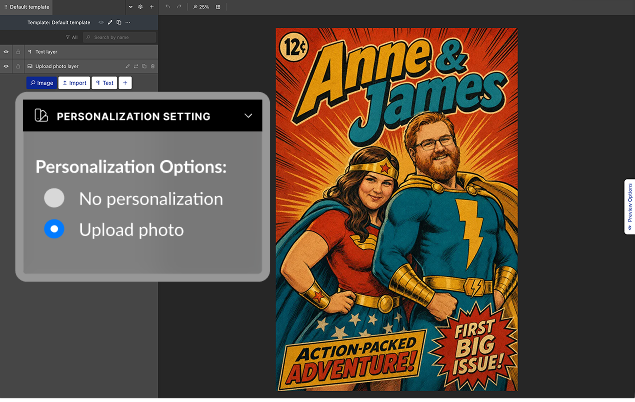
Create a design in Teeinblue
Create a design in Teeinblue artwork editor, add an Upload Photo layer and Enable personalization for this layer.
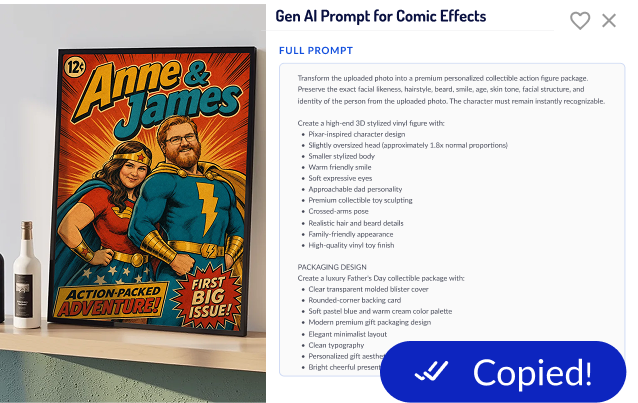
Copy a prompt example
Browse the AI image prompt examples, pick the AI effect you want, and hit Copy.
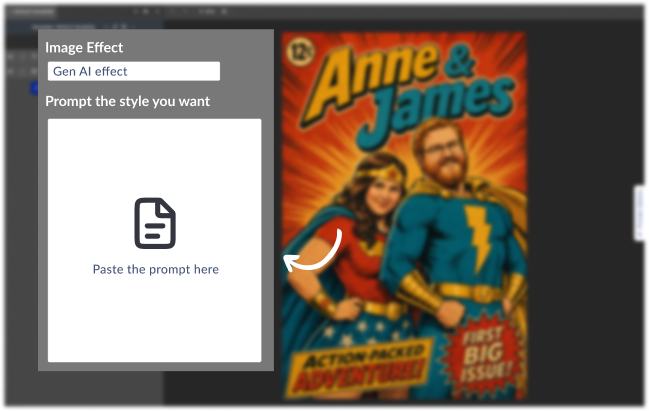
Paste the prompt
Open your Upload Photo layer, under Image effects, choose Gen AI Effect and Paste it in the Prompt field.
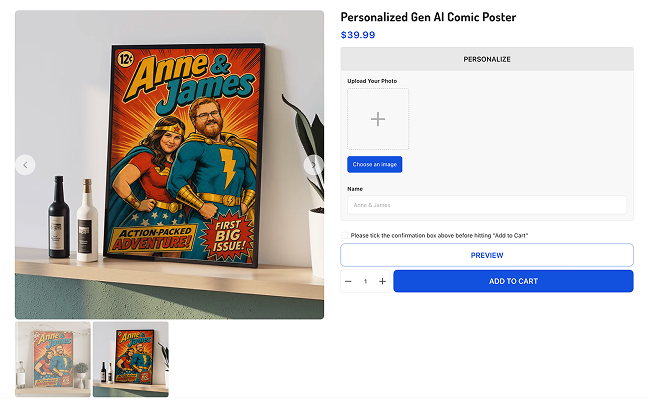
Launch & sell
Create a campaign, launch it to your store. Now every customer's upload photo gets the AI effect automatically.
Key Elements of a Great
AI Image Prompt
An AI image prompt is a text instruction that tells an AI how to transform a photo into a new style. A strong one combines a few key elements. Include these and the model understands your intent, so your product images come out consistent and print-ready instead of random.
| Element | What to specify | Example |
|---|---|---|
| Action | The editing verb that starts the prompt | “Turn this photo into a watercolor portrait” |
| Style | The art direction your niche buys | Watercolor, line art, 3D toy figure, comic |
| Lighting | Light source and mood | soft studio light, golden hour, warm |
| Composition | Angle, framing, background | centered, eye-level, plain white background |
| Likeness | What to keep from the uploaded photo | “Keep the face accurate, same pose and expression” |
| Output for production files | What the product file needs | plain or single-color background, square 1:1, high resolution, subject not cropped |
Other AI Image Prompt
Templates to Copy and Paste
These AI image prompts below are reusable frameworks. The first two turn an uploaded portrait or landscape photo into custom art, the same idea as the examples above. The rest cover the product and marketing images a custom-product store needs. Each one has a fill-in-the-blank template plus a ready-to-use reference prompt, so swap the bracketed parts or copy the reference as-is.
People portrait
Keep the face, hairstyle, and expression accurate and recognizable.
Lighting: [soft, even studio light]. Composition: centered head-and-shoulders, subject not cropped.
Colors: [warm and natural]. Background: [plain white / soft color wash / transparent].
High resolution, print-ready for [canvas / mug / t-shirt].
Desired output: A soft watercolor head-and-shoulders portrait of a couple in warm tones, ready to print on canvas.
Pet portrait
Keep the breed, fur pattern, markings, and face true to the original photo.
Optional theme: [velvet royal outfit / flower crown / none]. Pose: [head-and-chest, facing forward].
Lighting: [soft, dramatic]. Background: [plain dark / soft wash / transparent].
Square 1:1, sharp fur detail, high resolution, print-ready.
Desired output: A regal oil-painting portrait of a dog in a velvet outfit on a dark background, for a framed print.
Landscape
Keep the recognizable landmarks, skyline, and layout of the scene.
Mood: [calm and warm]. Palette: [muted, soft]. Detail: [loose brushwork / fine clean lines].
Composition: [wide and balanced], with open space for a caption or coordinates.
Wall-art quality, high resolution, print-ready for [framed print / canvas].
Desired output: A calm, muted watercolor of a mountain lake with a wide composition, sized for framed wall art.
Best Practices to Write
AI Image Prompts That Sell
- Be specific about the action. Start with an editing verb so the AI transforms the uploaded photo like “turn this photo into…” or “restyle this as…”.
- Name the exact style your niche buys. Watercolor and line art sell for portraits; comic and 3D figures sell for fun gifts. Match the style to the product.
- State the lighting. Lighting sets mood more than anything else. “Soft window light” and “dramatic studio light” produce completely different products.
- Tell it the output format. Ask for a transparent or plain background, a square or portrait ratio, and high resolution so the file is print-ready.
- Protect the important details. Add “keep the face accurate and undistorted” or “keep the design centered and sharp” to prevent faces and text from warping.
You Asked, We Answered
What are AI image prompt examples?
AI image prompt examples are text instructions you give an AI image generator (like GPT Image, Flux, or Gemini) to turn a photo into a specific style or effect - watercolor, oil painting, caricature, line art, and more.
For personalized products, AI image prompts can be used in personalizer apps like Teeinblue to turn customer photos into watercolor paintings, sketches, comic book covers, AI art, and more.
Are the AI image prompt examples for personalized products listed here free to use?
Yes. Every prompt in this library is free to copy and use in your own store. You'll only pay for the AI model's usage (charged by your chosen provider, e.g. OpenAI or Flux) when images are generated.
Where can I find the best AI prompts for personalized products?
This library provides hand-picked AI prompts for images specifically designed for personalized products. Each prompt is optimized to work with customer-uploaded photos and Teeinblue's Gen AI Effect feature.
Can I edit these AI prompts for images?
Absolutely. Each prompt is a starting point. You can modify any prompt to create different AI art styles, add specific details, change backgrounds, or tailor the output to your products and brand.
Which AI models do these AI image prompt examples work with?
The AI image prompt examples are written to work across the AI models Teeinblue and Imagenhub support - GPT Image, Flux, Gemini, etc. Results vary slightly between models, so you can test the same prompt on different ones to find your favorite.
Do I need design skills to use these AI image prompts?
No. That's the point - you copy a proven prompt instead of creating AI art from scratch. Set it up once on your product, and your buyers personalize their own designs by uploading a photo.
Some prompts say "pair with Remove Background" or need a NAME variable, what does that mean?
Some prompts include additional recommendations or personalization variables to improve the final result.
"Pair with Remove Background" means you'll get the best output by removing the photo background before applying the AI effect.
NAME variables are placeholders that can be replaced with customer-provided information, such as a name, which will be incorporated into the generated design.
Simply replace the variable with your personalization field or desired text before publishing your product.
Are these AI image prompts suitable for commercial use?
Yes. These prompts are designed for sellers creating and selling personalized products through Shopify, Etsy, and other ecommerce platforms.
Which AI art styles are most popular for personalized products?
Some of the most popular AI art styles include:
- Watercolor portraits
- Pencil sketches
- Oil paintings
- Caricatures
- Comic book covers
- Line art
- Vintage illustrations
- Fantasy artwork
These styles work particularly well for gifts, memorial products, pet portraits, and family keepsakes.
Can I use AI art on personalized products?
Yes. AI art is increasingly used on personalized canvases, posters, mugs, ornaments, apparel, phone cases, and other print-on-demand products. By combining AI-generated artwork with customer photos, sellers can offer unique personalized experiences.